Library of Formatting Examples:Small Caps/02A: Difference between revisions
Jump to navigation
Jump to search
No edit summary Tag: Manual revert |
No edit summary |
||
| Line 1: | Line 1: | ||
{{LOFE:Navbar|prev=Small Caps/01A|next=Small Caps/03A|cat=Small Caps}} | {{LOFE:Navbar|prev=Small Caps/01A|next=Small Caps/03A|cat=Small Caps}} | ||
{{LOFE:Example start |image-filename=102-02A.png|iw= | {{LOFE:Example start |image-filename=102-02A.png|iw=35|tw=35}} | ||
{{LOFE:Blank}} | {{LOFE:Blank}} | ||
{{LOFE:Blank}} | {{LOFE:Blank}} | ||
Latest revision as of 03:12, 28 December 2025
| Distributed Proofreaders: Activity Hub · Wiki · Forums · Blog | ||
| << (Small Caps/01A) | Library of Formatting Examples Small Caps |
(Small Caps/03A) >> |
Page image

Correctly formatted text
[blank line]
[blank line]
[blank line]
[blank line]
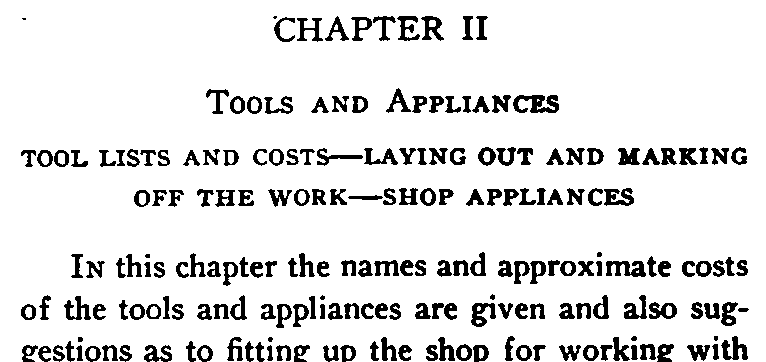
CHAPTER II
[blank line]
[** We mark Mixed-small-caps]
<sc>Tools and Appliances</sc>
[blank line]
[** We do NOT mark all uppercase headings]
[** or subheadings]
TOOL LISTS AND COSTS--LAYING OUT AND MARKING
OFF THE WORK--SHOP APPLIANCES
[blank line]
[blank line]
[** When the first words are in small caps,]
[** change them to normal mixed-case]
In this chapter the names and approximate costs
of the appliances are given and also suggestions
as to fitting up the shop for working with
Headings
We mark Mixed-small-caps, as seen in the main heading above.
We do not mark all-upper-case headings or sub-headings, even when the letters look like all-lower-case small-caps. Headings are wrappable unless you use no-wrap or add blank lines. Here, the chapter ID, name, and sub-heading are separated by blank lines, but since the sub-heading clearly is wrappable, it wasn't placed in no-wrap.
First words
When the first words in a chapter or section are in small caps, we just change them to normal mixed-case and do not mark them.